carreralib — Python interface to Carrera® DIGITAL 124/132 slotcar systems
This module provides a Python interface to Carrera® DIGITAL 124/132 slotcar systems connected via a serial (cable) connection.
>>> from carreralib import ControlUnit
>>> cu = ControlUnit('/dev/ttyUSB0')
>>> cu.version()
'5337'
>>> cu.poll()
Status(fuel=(14, 14, 14, 14, 14, 14, 0, 0), start=0, mode=6,
       pit=(False, False, False, False, False, False, False, False),
       display=8)
>>> cu.start()
>>> cu.poll()
Status(fuel=(14, 14, 14, 14, 14, 14, 0, 0), start=1, mode=6,
       pit=(False, False, False, False, False, False, False, False),
       display=8)
>>> cu.start()
>>> cu.poll()
Timer(address=1, timestamp=105295, sector=1)
>>> cu.poll()
Timer(address=0, timestamp=105410, sector=1)
Demo RMS
For demonstration purposes, the carreralib module can be used
from the command line to run a simple curses-based race management
system (RMS):
python -m carreralib /dev/ttyUSB0
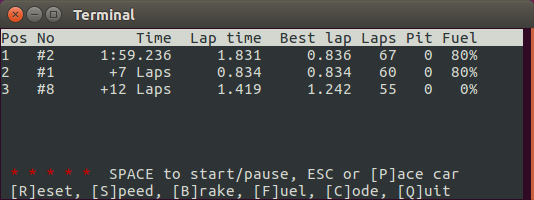
Within the RMS, use the space key to start or pause a race, R to
reset a race, and Q to quit.
When called without a device name or path, this will list command line options and the serial or Bluetooth devices that a Control Unit may be connected to, e.g. on Linux:
$ python -m carreralib
usage: python -m carreralib [-h] [-l LOGFILE] [-t TIMEOUT] [-v] [DEVICE]

positional arguments:
  DEVICE                the Control Unit device, e.g. a serial port or MAC address

options:
  -h, --help            show this help message and exit
  -l LOGFILE, --logfile LOGFILE
                        where to write log messages
  -t TIMEOUT, --timeout TIMEOUT
                        maximum time in seconds to wait for Control Unit
  -v, --verbose         write more log messages

devices:
  /dev/ttyUSB0        USB-Serial Controller
On Windows, this will show the respective COM port:
devices:
  COM3                Prolific USB-to-Serial Comm Port (COM3)
If a Carrera AppConnect® Bluetooth device is found, this will show the Bluetooth MAC address of the device instead:
devices:
  C6:34:FA:1D:1D:5D   Control_Unit
So instead of /dev/ttyUSB0, specify the respective COM port on
Windows, or the Bluetooth MAC address (e.g. C6:34:FA:1D:1D:5D)
when using Carrera AppConnect®.
Control Unit Firmware
To show the current firmware version of your Control Unit, use:
python -m carreralib.fw /dev/ttyUSB0
Note
Trying to update the firmware of your Control Unit is a potentially dangerous operation that may wreck your hardware. Use at your own risk!
To upgrade (or downgrade) your Control Unit’s firmware, given an ASCII firmware file, use:
python -m carreralib.fw /dev/ttyUSB0 digital_blackbox_NF_V337.HMF
Note
Control Unit firmware are the intellectual property of Carrera Toys GmbH, and are only provided by the copyright holders. Please do not ask for firmware files here!
API
The ControlUnit class encapsulates a connection to a Carrera®
DIGITAL 124/132 Control Unit (CU) and provides all the features needed
to implement a custom race management system (RMS).
Note that ControlUnit uses zero-based controller addresses, so
0 corresponds to controller #1, 6 is the address the
autonomous car, and 7 the address of the pace car.
Connection Module
This module is mostly of interest to developers who want to create their own connection implementation, for example to use a Bluetooth implementation.
Protocol Module
This module provides utility functions for dealing with the Carrera® DIGITAL 124/132 protocol.